
Managed IT
Ways to Submit Service Tickets
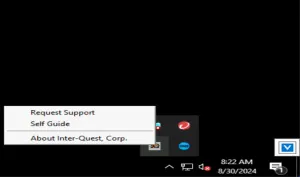
VSA (IQ icon in the system tray on managed workstations)
Right click the IQ icon in the system tray and select “Request Support”
Email us at support@interquestcorp.com
Phone
Call us at 920-885-0141
Online Portal
Use our online ticketing portal at https://portal.wemaketechsimple.com
Note: You must request access to the ticketing portal before you can use this option.
Helpful Information to Provide in a Ticket
- Do you need this issue addressed immediately? If so, please call us shortly after submitting your ticket so that we can work with you to coordinate a quicker response.
- When are you generally available for us to work with you on this issue if needed? We may send you a scheduling link after your new ticket is created to help us schedule with you.
- How many people is this affecting?
- Is there an existing support ticket for this same issue?
- Is this a new issue or have you had the issue before?
- How often does it happen?
- Is there a reasonable work-around?
- What workstation/device is this?
- Is there a hard deadline?
- What troubleshooting steps have you tried?
- Would you like someone onsite? If so, when?